How Does a Mug Alive Interactive Coffee Mug Work?
How Does a Mug Alive Interactive Coffee Mug Work?
How Does a Mug Alive Interactive Coffee Mug Work?
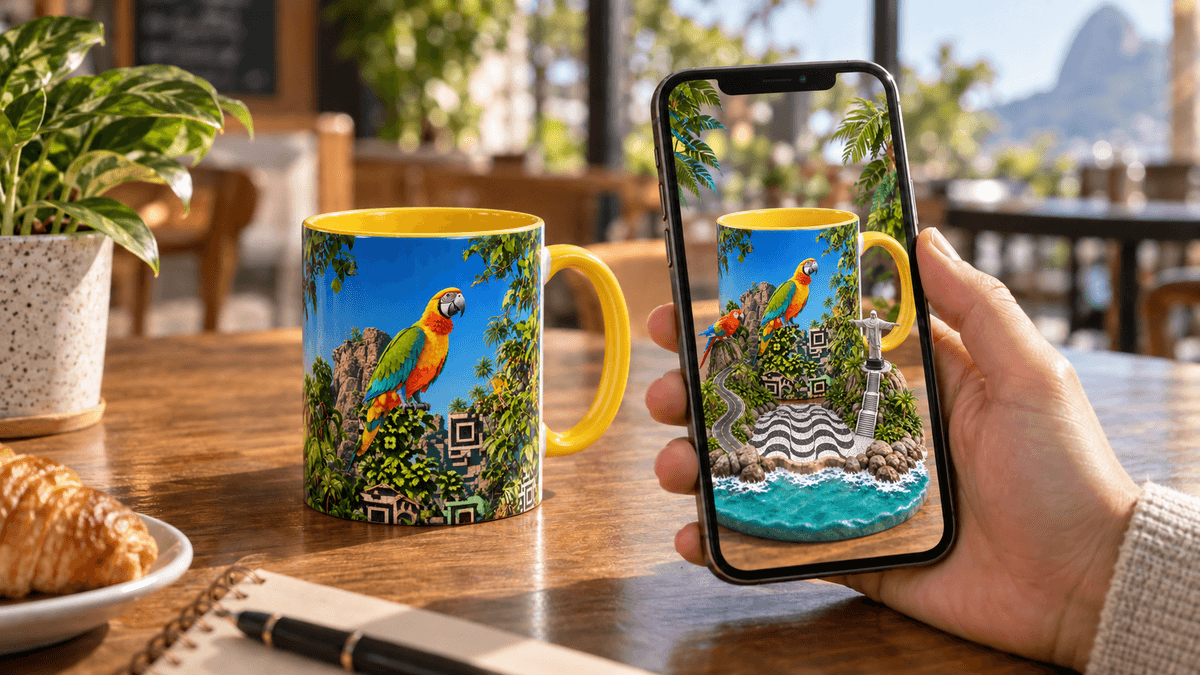
Mug Alive looks like a beautifully designed coffee muguntil you scan it.
A QR code integrated into the artwork opens an interactive experience in your smartphone’s browser. When you point your phone at the mug, a hidden digital world appears on your screen.
No app. No batteries. No Bluetooth. No complicated setup.
The physical mug remains perfectly still. The animation appears only on the smartphone screen, creating the impression that the artwork has suddenly come alive.
One mug. Two worlds.
How an Interactive Mug Works: The Quick Answer
Mug Alive connects a real ceramic mug with an interactive digital experience using your smartphone.
- Scan the QR code integrated into the mug’s design.
- Open the experience in your smartphone browser and allow camera access.
- Point your phone at the artwork and watch the hidden digital experience appear on your screen.
The experience runs directly in a mobile browser such as Safari or Chrome. You do not need to download an application, create an account or connect the mug to another device.
The mug contains no screen or electronic components. Your smartphone supplies the camera, internet connection and display needed to reveal the digital layer.
Step 1: Scan the QR Code
Open the standard camera on your smartphone and point it at the QR code incorporated into the mug’s artwork.
When the link appears, tap it once. The Mug Alive experience will open directly in your browser.
You do not need a dedicated QR code application. Most recent iPhones and Android smartphones can recognize QR codes through their normal camera.
If the code does not scan immediately, move the phone slightly farther away and avoid reflections from windows or ceiling lights. Make sure the entire code is visible inside the camera frame.
Step 2: Allow Camera Access No App Required
When the experience opens, your browser may ask for permission to use the smartphone camera. Select Allow.
This permission is necessary because the browser needs to recognize the physical artwork printed on the mug. The camera connects the real object to its hidden digital content.
You are not installing an application, pairing a Bluetooth device or creating an account. The technology runs through a secure web page using the browser already installed on your phone.
This makes Mug Alive easy to discover and share. A recipient can open the box, scan the mug and reveal the surprise within moments.
Step 3: Point Your Smartphone at the Mug
Keep the browser experience open and point the rear camera at the illustrated section of the mug.
For the best result, place the mug on a stable surface with the main artwork facing the camera. Hold the phone at a comfortable distance and keep the design centered on the screen.
When the browser recognizes the artwork, the digital content appears over the image of the mug on the smartphone screen.
The physical mug does not move or transform. Someone looking directly at it will continue to see the printed ceramic design. The hidden animation is visible only to someone viewing the mug through the phone.
This connection between a physical object and a digital experience is called phygital: part physical, part digital.
What Makes the Mug Appear to Come Alive?
The effect connects three elements:
- The QR code opens the correct online experience.
- The printed artwork gives the smartphone camera a visual target to recognize.
- The browser displays the corresponding digital content on the phone screen.
The smartphone combines the live camera image with the digital layer. The animation therefore appears connected to the real mug when viewed through the screen.
The ceramic mug does not transmit information to the phone. It does not contain a radio, processor, battery or hidden display. The interaction comes from the relationship between the physical artwork, the browser and the smartphone camera.
Is Mug Alive a Smart Mug or a Heat-Sensitive Mug?
No. Mug Alive is different from temperature-controlled smart mugs and heat-sensitive color-changing mugs.
A heat-sensitive mug changes appearance when hot liquid is added. A temperature-controlled mug contains electronic components that monitor or regulate heat.
Mug Alive works differently. You scan its QR code and point a smartphone at its artwork. The digital effect then appears exclusively on the phone screen.
Mug Alive does not react to heat and does not keep coffee warm electronically. Its purpose is to transform illustrated ceramic artwork into a surprising digital experience.
Why Does Mug Alive Work Without an App?
Modern mobile browsers can access a smartphone camera and display interactive visual content directly from a web page.
This removes one of the biggest barriers associated with digital products. The user does not need to search an app store, download unfamiliar software, remember a password or create an account before discovering the surprise.
The process remains simple:
Scan. Allow. Point. Watch it come alive.
This is especially important when Mug Alive is offered as a gift. The person receiving it may know nothing about the product, but the experience can still be understood in seconds.
Why Is Mug Alive More Than a Novelty Mug?
Mug Alive is designed to function in two ways.
First, it is a real ceramic coffee mug featuring original artwork. It can be used every day for coffee, tea or another favorite drink.
Second, it contains a hidden digital layer that can be activated and shown to friends, family, coworkers or visitors.
The interactive feature does not replace the physical design. It adds another dimension to it. Even without a smartphone, the product remains a functional and visually distinctive mug.
This balance between everyday usefulness and digital surprise makes Mug Alive a collectible, conversation piece and unexpected gift.
The moment they realize it isn’t just a mug becomes part of the gift.
What Do You Need to Use Mug Alive?
You only need:
- A Mug Alive interactive mug
- A reasonably recent smartphone
- A working rear camera
- Safari, Chrome or another compatible mobile browser
- An internet connection while the experience loads
- Permission for the browser to access the camera
- Enough light for the camera to recognize the artwork
You do not need batteries, charging cables, Bluetooth, Wi-Fi pairing or a dedicated application.
What Should You Do if the Experience Does Not Start?
Most problems can be solved in a few seconds:
- Make sure camera access has been allowed.
- Open the experience directly in Safari or Chrome.
- Place the mug on a stable surface.
- Face the main artwork toward the camera.
- Avoid strong reflections on the ceramic surface.
- Start with the phone approximately an arm’s length away.
- Move the phone slowly until the artwork is recognized.
If camera access was previously blocked, open the browser settings, authorize the camera and reload the page.
More detailed assistance is available on the Mug Alive Help page:
Can the Mug Still Be Used Without a Smartphone?
Yes. Without a phone, Mug Alive remains a fully functional illustrated ceramic mug.
The smartphone is only needed to reveal the additional digital experience. The physical object does not depend on the technology for normal everyday use.
The mug should be desirable before it is scanned—and even more memorable afterward.
Does the Mug Send Personal Information to the Phone?
The mug does not transmit data like a Bluetooth device. It contains no electronic communication system.
The QR code directs the browser to the correct digital experience, while the camera recognizes the visible artwork. Camera access remains controlled by the permission settings on the user’s smartphone.
Can You Give Mug Alive to Someone Who Is Not Technical?
Yes. Anyone who can scan a QR code and authorize camera access can discover the experience.
The absence of an app makes the process particularly accessible. The recipient does not need to understand augmented reality or any technical terminology.
They simply scan the mug, point their phone at the artwork and watch what happens.
How to Choose the Right Interactive Mug
Begin with the physical design. Choose artwork that reflects the recipient’s personality, memories or interests.
A colorful tropical scene might appeal to someone who loves Brazil and travel. A neon Japanese design could suit a fan of contemporary Asian culture. A New York-inspired mug can evoke the energy and iconic symbols of the city.
The best Mug Alive design is one the recipient will enjoy as a real object before discovering its hidden world.
One Mug. Two Worlds.
Mug Alive brings together ceramic design and browser-based digital technology without placing electronics inside the product.
The mug exists in the physical world. The animation exists in the digital world. The smartphone brings the two together.
That is what makes the experience memorable: an apparently familiar object suddenly reveals something completely unexpected.
Looks like a mug. Until you scan it.
Ready to discover what is hiding inside the artwork?
Explore the Mug Alive collection at https://www.mugalive.com/